WebMCP: Google's New Standard Turning Websites Into AI Tools
In February 2026, Google Chrome shipped something that could quietly reshape how the entire web works. WebMCP — the Web Model Context Protocol — landed in Chrome 146 Canary as an early preview, and it introduces a radical idea: what if every website could tell AI agents exactly what it can do, instead of forcing them to guess?
Developed jointly by engineers at Google and Microsoft and incubated through the W3C's Web Machine Learning community group, WebMCP is a proposed web standard that lets any website expose structured, callable tools directly to AI agents through a new browser API: navigator.modelContext. Instead of AI agents scraping your DOM, reading screenshots, or reverse-engineering your UI, your site declares its capabilities as typed, schema-validated functions that agents can discover and invoke.
For creative teams and agencies building web experiences, this isn't just a developer curiosity. It's the beginning of a new interaction layer for the web — one where AI agents are first-class visitors alongside human users.
What WebMCP Actually Is (And What It's Not)
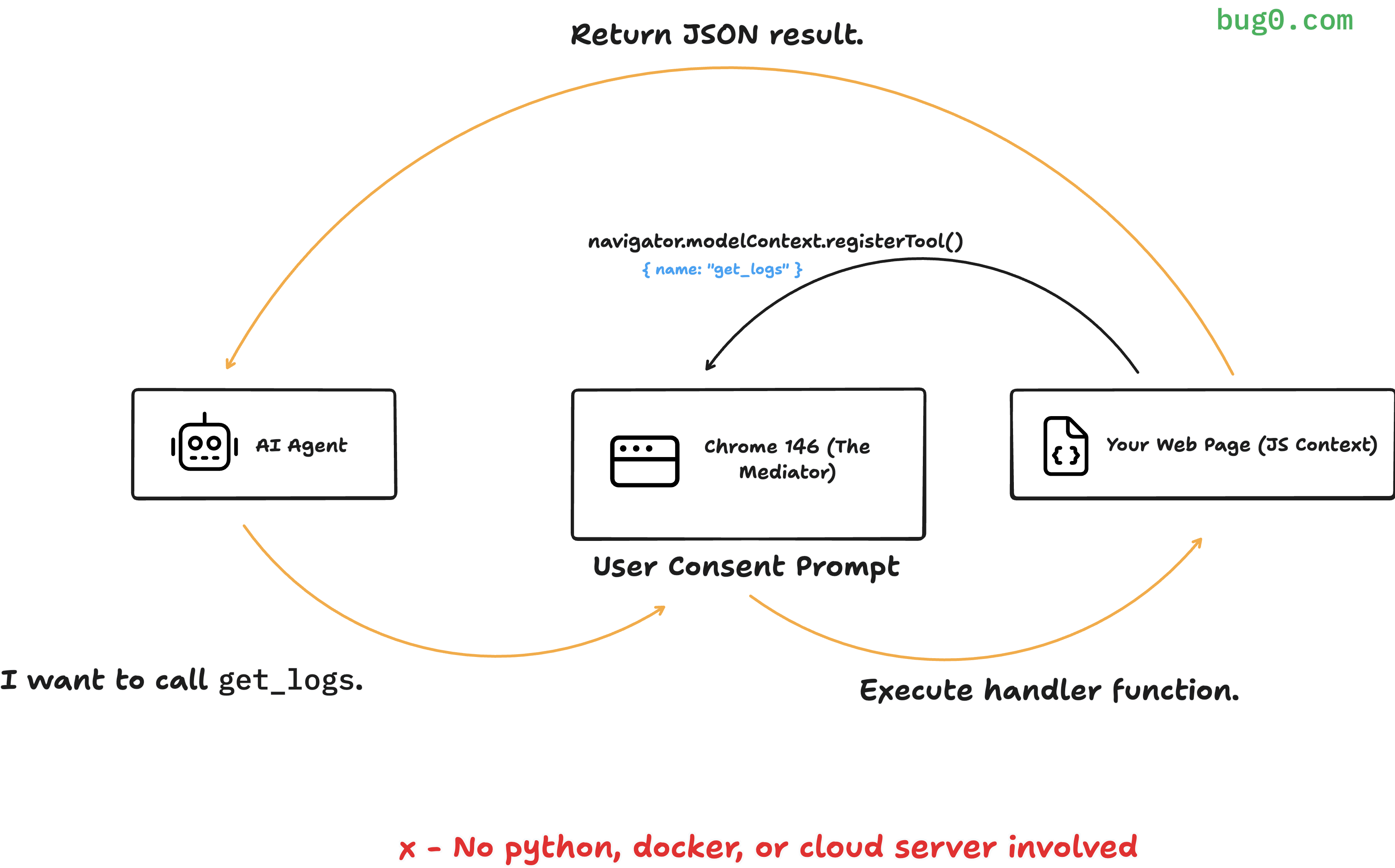
First, a critical distinction: WebMCP is not a replacement for Anthropic's Model Context Protocol (MCP). The two protocols are complementary and operate at different layers of the stack.
| MCP (Anthropic) | WebMCP (Google/Microsoft) | |
|---|---|---|
| Operates at | Backend — server-to-server | Client-side — in the browser |
| Architecture | JSON-RPC, hosted MCP servers | Browser-native API (navigator.modelContext) |
| Deployment | Requires backend server (Python/Node.js) | No server needed — runs in the page |
| Use case | Connect AI agents to APIs, databases, services | Make websites "agent-readable" |
| Authentication | Server-to-server auth, API keys | Browser security model (CORS, CSP, same-origin) |
| Best for | Service-to-service automation | User-present, browser-based interactions |
Think of it this way: MCP is how AI agents talk to backend services. WebMCP is how AI agents talk to websites. A platform like XainFlow uses MCP to let Claude or Cursor control its generation pipeline server-side. WebMCP would let an AI agent browsing xainflow.com understand the pricing page, search for workflow templates, or interact with demo forms — all through structured tool calls instead of fragile screen-scraping.
"MCP connects agents to backend services. WebMCP connects agents to browser-based interfaces. Together, they make the entire stack agent-accessible."
Two APIs: Declarative and Imperative
WebMCP provides two complementary approaches for making your site agent-ready. You can use either or both depending on the complexity of your interactions.
The Declarative API: Three HTML Attributes
The simplest path requires zero JavaScript. You add attributes to existing HTML forms, and the browser automatically exposes them as callable tools to any visiting AI agent.
<form toolname="searchWorkflows"
      tooldescription="Search AI workflow templates by category or keyword">
  <input name="query" type="text" required
         placeholder="Search workflows...">
  <select name="category">
    <option value="video">Video</option>
    <option value="image">Image</option>
    <option value="brand">Brand Kit</option>
  </select>
  <button type="submit">Search</button>
</form>
That's it. Three attributes — toolname, tooldescription, and the standard HTML form inputs — and your search form becomes a structured tool that AI agents can discover and call. The browser extracts the input schema from your form fields, including types, validation rules, and required constraints.
The Declarative API works best for existing forms — contact forms, search bars, filters, and checkout flows. If your site already has forms, adding WebMCP support is a 5-minute change per form.
The Imperative API: JavaScript-Powered Tools
For more complex interactions that go beyond form submissions, the Imperative API lets you register tools programmatically with full JSON Schema definitions and async handlers.
navigator.modelContext.registerTool({
  name: "get_pricing_plans",
  description: "Get available pricing plans with features and pricing details",
  inputSchema: {
    type: "object",
    properties: {
      team_size: {
        type: "string",
        enum: ["individual", "team", "enterprise"],
        description: "Target team size category"
      }
    }
  },
  async execute({ team_size }) {
    const plans = await fetchPricingData(team_size);
    return {
      content: [{
        type: "text",
        text: JSON.stringify(plans)
      }]
    };
  }
});
The Imperative API gives you full control: custom logic, database queries, API calls, multi-step workflows — anything you can do in JavaScript, you can expose as a typed tool.
React Integration: The useWebMCP Hook

For React applications — which includes most modern web apps — the community has already built a clean integration layer. The @mcp-b/react-webmcp package provides a useWebMCP hook that handles tool registration, lifecycle management, and cleanup automatically.
import { useWebMCP } from '@mcp-b/react-webmcp';
import { z } from 'zod';

function WorkflowExplorer() {
  const [workflows, setWorkflows] = useState([]);

  useWebMCP({
    name: 'search_workflows',
    description: 'Search available AI workflow templates',
    inputSchema: {
      query: z.string().describe('Search keywords'),
      category: z.enum(['video', 'image', 'brand'])
        .optional()
        .describe('Filter by category')
    },
    handler: async ({ query, category }) => {
      const results = await searchWorkflows(query, category);
      setWorkflows(results);
      return {
        success: true,
        count: results.length,
        workflows: results.map(w => w.name)
      };
    }
  });

  return <WorkflowGrid items={workflows} />;
}
The hook uses Zod for schema validation, auto-registers the tool on mount, and cleans up on unmount. It also has full access to React state, so tools can update the UI in real time when an agent invokes them — the user sees the same visual response whether they clicked a button or an AI agent called the tool.
Installation is straightforward:
npm install @mcp-b/react-webmcp @mcp-b/global zod
The @mcp-b/global package provides a polyfill for navigator.modelContext in browsers that don't yet support the native API. Import it once at your app's entry point, and the React hook works seamlessly across all browsers.
Security: Browser-Native by Design

WebMCP doesn't bolt security on as an afterthought — it inherits the browser's entire security model. This is one of the key advantages of being a client-side standard rather than a backend protocol.
Built-in Protections
- Same-origin policy — Tools inherit their hosting page's origin boundary. A tool on
example.comcan't access data fromother-site.com - HTTPS required — The API is restricted to secure contexts. No HTTP, no file:// URIs
- CSP integration — Tool execution respects Content Security Policy directives, so your existing security headers apply
- Domain-level isolation — Tool availability is scoped to specific domains with hash verification
The agentInvoked Flag
One particularly clever feature: SubmitEvent.agentInvoked. When a form is submitted by an AI agent rather than a human, this flag is set to true. This lets your server-side code differentiate between human and agent actions — useful for rate limiting, analytics, fraud detection, or requiring additional verification for agent-initiated transactions.
form.addEventListener('submit', (event) => {
  if (event.agentInvoked) {
    // Agent submitted this form — log, verify, or rate-limit
    analytics.track('agent_form_submission', { tool: 'searchWorkflows' });
  }
});
Human-in-the-Loop
The standard is explicitly designed around cooperative, human-in-the-loop workflows. For sensitive operations (purchases, deletions, account changes), the browser can require explicit user confirmation before executing an agent's tool call. Tools can also declare themselves as read-only to bypass confirmation for query-only operations.
Performance: Why Structured Tools Beat Screen-Scraping
The performance argument for WebMCP is compelling. Current AI agents that interact with websites typically work by taking screenshots, parsing the visual layout, and then generating mouse clicks and keystrokes to simulate human interaction. This approach is slow, computationally expensive, and brittle.
WebMCP replaces this with direct function calls:
| Metric | Screenshot-Based | WebMCP Structured |
|---|---|---|
| Token usage | Full page screenshot tokens | Minimal schema + response |
| Accuracy | ~70-80% (visual parsing errors) | ~98% (schema-validated) |
| Computational overhead | High (vision model processing) | Low (direct function calls) |
| Reliability | Breaks on UI changes | Stable while schema is maintained |
Early benchmarks from the W3C community group report an 89% reduction in token usage compared to screenshot-based approaches, with task accuracy jumping to approximately 98%. For platforms that serve AI agents at scale, this translates directly to lower costs and faster response times.
"WebMCP turns every website from a visual puzzle that agents have to solve into a typed API they can call directly. It's the difference between OCR-ing a menu and reading a JSON endpoint."
Current Status and What's Next
Let's be clear about where WebMCP stands today:
- Available in: Chrome 146 Canary only, behind the "WebMCP for testing" feature flag
- Standards process: Transitioning from W3C community incubation to formal draft
- Production-ready: Not yet — this is early preview for prototyping and feedback
- Expected timeline: Formal browser announcements expected mid-to-late 2026, likely at Google Cloud Next or Google I/O
The specification repo is public at github.com/webmachinelearning/webmcp, and the W3C Community Group is actively reviewing security, privacy, and interoperability concerns. Microsoft's involvement suggests Chromium-based Edge support will follow Chrome closely.
What creative teams should do now
1. Don't implement WebMCP in production yet. The API surface may change before the spec is finalized. Investing engineering time now risks rework.
2. Do start thinking about your "agent surface." Which parts of your website would be most valuable as structured tools? Search, product browsing, demo requests, pricing lookups — these are the interactions that AI agents will want to perform on your behalf.
3. Audit your forms. The Declarative API is so simple that adding WebMCP support later will be trivial — if your forms are well-structured. Now is a good time to ensure your forms use semantic HTML, proper input types, and descriptive names.
4. Consider the dual-protocol future. If your platform already supports backend MCP (like XainFlow does), WebMCP adds a complementary client-side layer. Backend MCP handles automation pipelines; WebMCP handles browser-based agent interactions. Together, they make your entire stack agent-accessible.
Platforms that support both backend MCP and client-side WebMCP will offer the most complete AI agent experience. Backend MCP for programmatic workflows; WebMCP for browser-based discovery and interaction.
What This Means for the AI-Powered Web
WebMCP represents a philosophical shift in how we think about websites. For two decades, the web has been designed for human eyes and human clicks. Screen readers and accessibility standards made the web more inclusive for people with disabilities. WebMCP does something analogous for AI agents — it makes the web machine-readable at the interaction level, not just the content level.
For creative platforms, agencies, and any business with a web presence, the implication is clear: your website is about to get a new category of visitor. AI agents that browse, search, compare, and transact on behalf of human users. The sites that speak their language — through structured, schema-validated tools — will capture that traffic. The ones that don't will force agents to guess, scrape, and struggle.
The standard is early. The opportunity to prepare is now. And the platforms that invest in agent-readiness today — through MCP on the backend and WebMCP on the frontend — will be the ones that define how AI agents experience the web.