Build creative workflows.
Connect every model step.
Flow Studio is a node-based canvas for production creative work. Connect assets, prompts, image models, video models, and post-processing tools into repeatable workflows your team can inspect, rerun, and save as Skills.
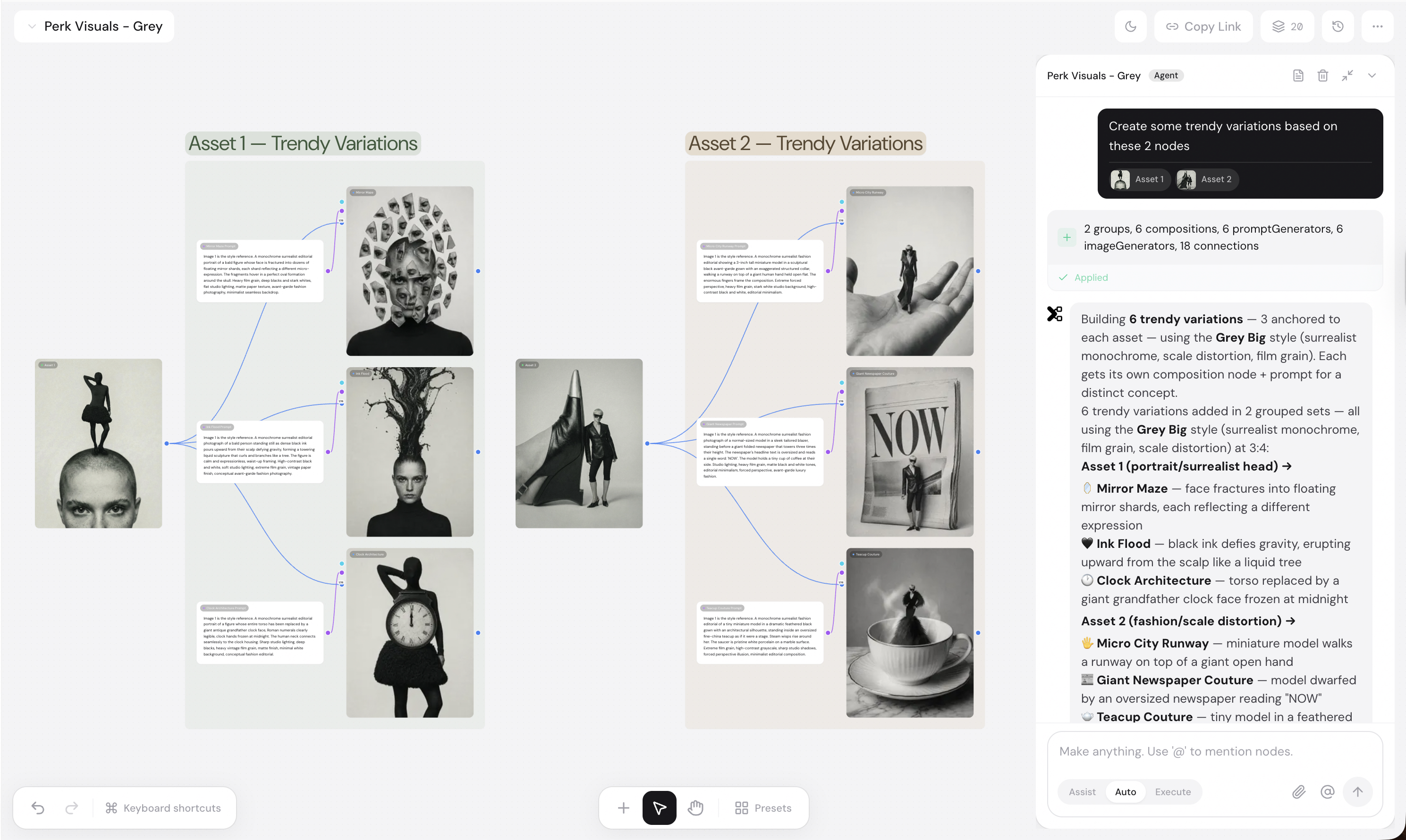
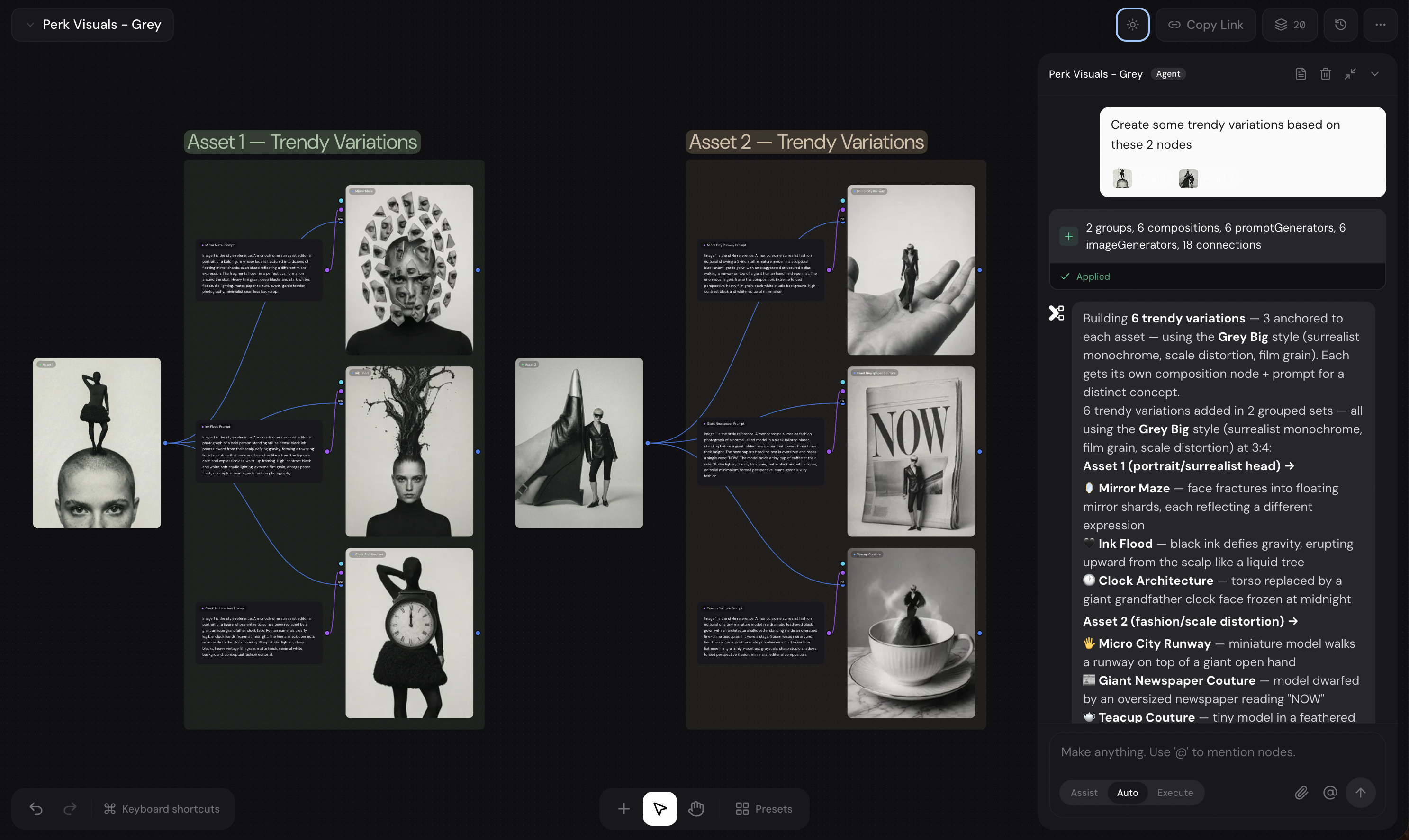
Design the pipeline once, rerun it with new context
Flow Studio gives creative teams a visual place to arrange assets, prompts, model calls, generated outputs, and delivery groups. Every node keeps its inputs, settings, and result lineage visible.
Designers stay in control: move nodes, edit prompts, regenerate individual branches, compare model outputs, and save the workflow as a Skill when the structure works.
Canvas structure
Workflow ready
2 asset groups, 6 compositions, 6 prompt generators, 6 image generators, and 18 connections organized in one reusable canvas.
Inputs
01Attach assets, references, prompts, and brand context.
Nodes
02Connect each model, tool, and transformation step.
Branches
03Generate, compare, and refine multiple creative routes.
Skill
04Save the repeatable workflow for future campaigns.
/grey-campaign
Reusable Skill
Built for campaign work, not one-off generations
Use the canvas when a team needs repeatable output, client context, and multiple creative branches from the same campaign input.
Campaign variants
Generate concept routes, copy, image prompts, and ad sizes from one campaign input.
Product image packs
Combine product references, brand styling, background changes, and exports.
Multi-shot video
Plan image references, motion prompts, extensions, and first/last frame shots.
Client workflows
Save proven workflows as Skills scoped to each workspace and brand.
Everything the canvas needs to ship
Flow Studio brings model orchestration, visual editing, branch control, and workflow reuse into the same workspace.
Visual Canvas
See every prompt, asset, model, output, and connection in one editable workspace.
Branch Control
Run a single node, selected branches, or the full workflow without rebuilding the canvas.
Model Routing
Route each step through the best image, video, or post-processing model for that task.
Reusable Skills
Turn successful flows into team-ready Skills with the same structure and fresh context.
Nine node types for real production flows
Each node carries context forward so your team can build, inspect, rerun, and reuse the whole creative pipeline.
Asset
Attach products, characters, logos, brand boards, backgrounds, or approved outputs.
Prompt
Write or expand production prompts with brand details and shot requirements.
Composition
Bundle the exact prompt and visual references a downstream model should use.
Image Generator
Route image branches through the right model, style, aspect ratio, and quality settings.
Video Generator
Create motion from text, references, existing video, extensions, or first/last frames.
Notes
Keep feedback, rationale, approvals, and production instructions beside the work.
Remove BG
Isolate products or subjects before reuse in new compositions.
Image Expand
Adapt winning assets to additional ratios and placements without restarting.
Image Edit
Convert, adjust, and prepare image assets for delivery.
Video workflows inside the same canvas
Plan the image references, prompt context, motion direction, and output branches before generating.
Standard
Generate video from a text direction when the idea does not need source media.
Remix
Transform an existing video while preserving useful structure or timing.
References
Use still images as character, product, style, or environment guides.
Extend
Continue a generated clip from its final frame to build longer sequences.
First / Last
Define a start and end frame so the model creates controlled motion between them.
Reuse what works, track what ships
Flow Studio keeps the workflow, outputs, costs, and versions tied together so production can scale beyond a single session.
Save as Skill
Turn a proven canvas into a reusable command your team can run with fresh brand or client context.
Version History
Snapshot a workflow before major changes and restore the exact structure when needed.
Generation History
Review outputs, model settings, prompt lineage, and credit usage from the same workspace.
Built for client teams
Share the canvas, keep permissions scoped, and leave production feedback where the work happens.
Flow Studio is designed for agencies and creative teams managing repeated client work. Workflows stay attached to workspaces, comments stay attached to nodes, and reusable Skills keep quality consistent.
Workspace sharing
Share approved workflows with the right team.
Scoped permissions
Keep client work isolated by workspace.
Node comments
Discuss feedback beside each generation step.
Build your first production workflow
Start with assets and prompts, build the winning canvas structure, then turn it into a reusable Skill.
No credit card required · 800 free credits to get started