For years, generating high-quality AI video meant relying on cloud platforms — uploading prompts, waiting in queues, and paying per-second fees that added up fast. That era is ending. At CES 2026, NVIDIA announced a wave of optimizations that bring production-grade 4K AI video generation to consumer RTX GPUs, powered by the open-source LTX-2 model and a deeply optimized ComfyUI pipeline.
For creative teams and agencies producing video content at scale, this shift from cloud to local changes the economics — and the creative possibilities — of AI video production entirely.
If you've been watching AI video from the sidelines waiting for it to become practical, this is the moment to pay attention.
What Changed: LTX-2 Meets RTX Hardware
The centerpiece of this announcement is LTX-2, an open-weights audio-video model from Lightricks that generates clips up to 4K resolution, 50 FPS, and 20 seconds long. Unlike earlier local models that produced blurry, inconsistent results, LTX-2 delivers output that rivals cloud-based services like Runway and Sora.
What makes LTX-2 special isn't just quality — it's the architecture. The model synchronously generates motion, dialogue, background noise, and music in a single pass. No separate audio pipeline, no post-sync headaches. One prompt, one cohesive clip.
"LTX-2 delivers results that stand toe-to-toe with leading cloud-based models — while running entirely on your local GPU."
It supports multimodal inputs: text prompts, reference images, audio clips, depth maps, and even reference video for precise creative control. For agencies that need consistent brand aesthetics across multiple clips, this level of control is a game-changer.
The Numbers: 3x Faster, 60% Less VRAM
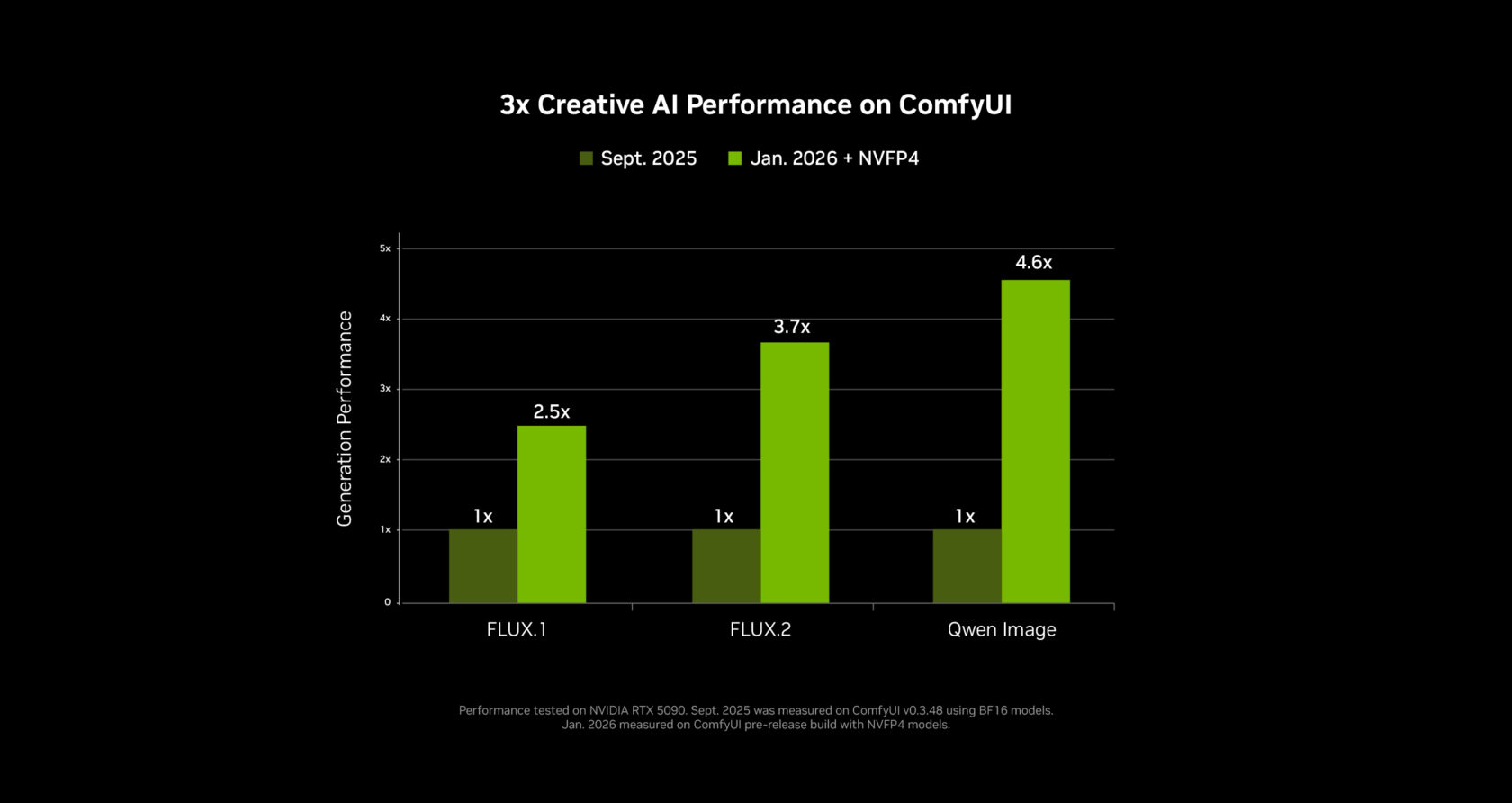
NVIDIA didn't just ship a new model — they re-engineered the entire pipeline. Working closely with the ComfyUI team, they delivered:
| Optimization | Performance Gain | VRAM Reduction |
|---|---|---|
| NVFP4 (RTX 50 Series) | 3x faster | 60% less |
| NVFP8 (RTX 40 Series) | 2x faster | 40% less |
| ComfyUI core optimizations | 40% faster | — |
These aren't theoretical benchmarks. On a GeForce RTX 5090 (32GB VRAM), a 720p 4-second clip at 24fps generates in roughly 25 seconds. Longer 8-second clips take around three minutes as the system engages weight streaming to use system RAM beyond the GPU's memory limit.
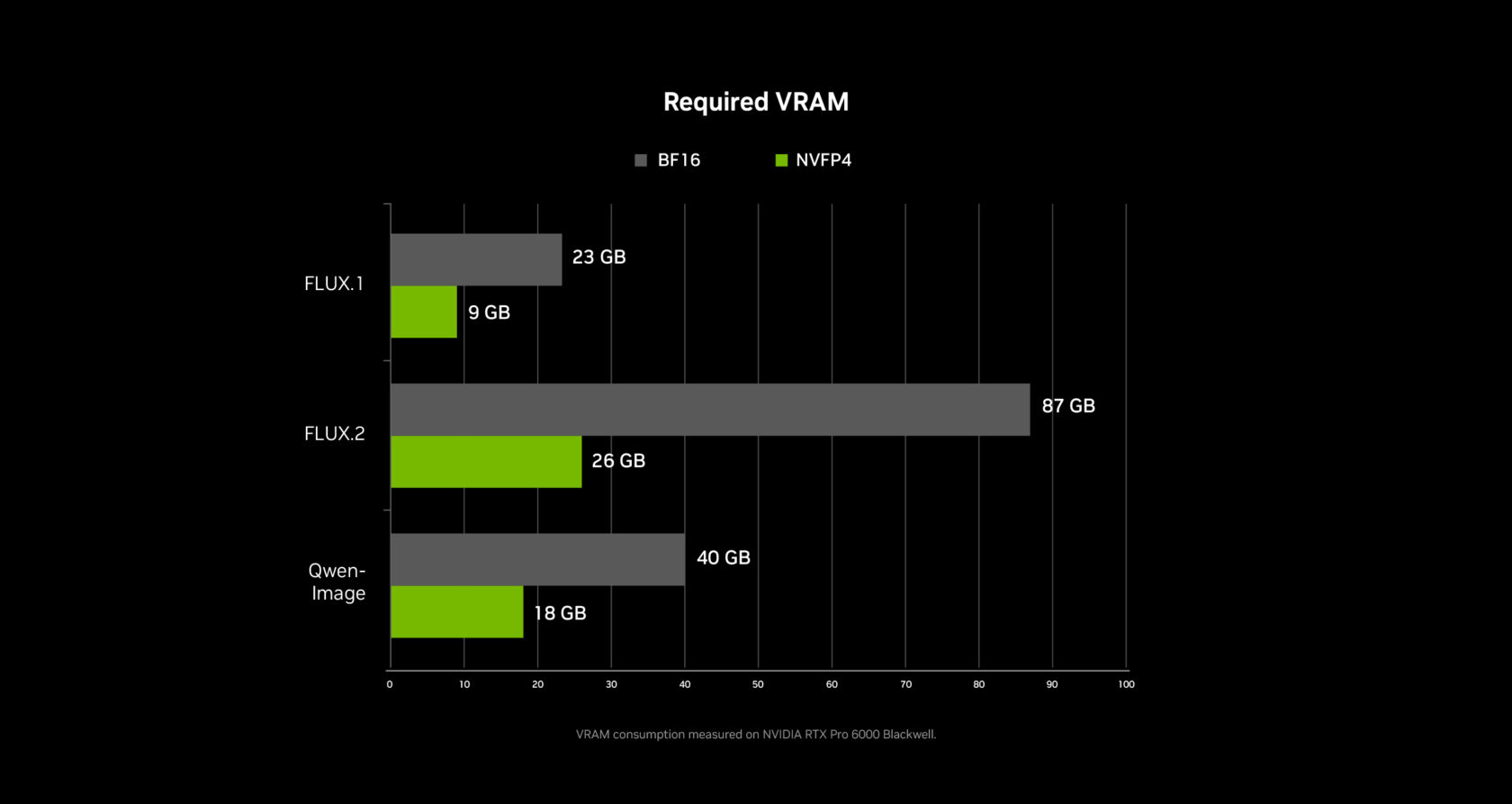
Even mid-range GPUs with 12-16GB VRAM can run LTX-2 effectively. Use 540p resolution with 4-second clips and 20 inference steps for the best quality-to-speed ratio on 8-16GB cards.
From 720p to 4K: The RTX Video Upscaler
Here's where the pipeline gets clever. You don't generate at 4K — you generate at 720p and upscale to 4K in seconds using NVIDIA's new RTX Video node built directly into ComfyUI.
The RTX Video upscaler runs in real time, leveraging dedicated hardware on RTX GPUs to sharpen edges, clean up compression artifacts, and produce crisp 4K output. This two-step approach (generate at 720p, upscale to 4K) is dramatically more efficient than brute-forcing 4K generation, and the quality difference is negligible.
For creative teams producing social media content, ad creatives, or product videos, this means you can iterate quickly at low resolution and only upscale your final selects — a workflow that mirrors how professional video editors already work.
Weight Streaming: Breaking the VRAM Barrier
One of the most practical innovations is weight streaming, a collaboration between NVIDIA and ComfyUI that lets the system offload model weights to system RAM when GPU VRAM runs out.
This means a mid-range RTX 4070 with 12GB of VRAM can still run complex multi-stage node graphs that would normally require 24GB+. Generation is slower when streaming kicks in, but it works — and for agencies that can't justify a $2,000 GPU for every team member, this makes local AI video accessible across the entire team.
| GPU Tier | VRAM | Recommended Settings |
|---|---|---|
| RTX 5090 / 5080 | 24-32GB | 720p24, 4-second clips, 20 steps |
| RTX 4080 / 4070 Ti | 12-16GB | 540p24, 4-second clips, 20 steps |
| RTX 4060 / 4070 | 8-12GB | 540p24, weight streaming enabled |
The Blender Pipeline: 3D Control Meets AI Generation
NVIDIA also introduced an RTX-powered pipeline that integrates Blender with AI video generation. Instead of relying solely on text prompts — which give you limited control over composition and camera movement — artists can set up 3D scenes in Blender, define keyframes, and use those as control inputs for LTX-2.
This hybrid approach gives creative directors something text-to-video never could: frame-level precision. Define your camera angles, character positions, and lighting in Blender, then let the AI handle textures, motion, and atmospheric details. It's the best of both worlds.
"The Blender integration gives creative directors what text-to-video never could — frame-level control over every shot."
What This Means for Creative Teams
The shift to local AI video generation isn't just about saving on cloud costs (though that's significant). It changes the creative process in fundamental ways:
- Privacy and IP protection — Client assets and concepts never leave your machine. For agencies handling confidential campaigns, this eliminates a major concern with cloud-based tools.
- Unlimited iteration — No per-generation fees means your team can experiment freely. Generate 50 variations of a scene without watching costs spiral.
- Offline capability — Produce AI video on a plane, at a client site, or anywhere without reliable internet.
- Pipeline integration — Local generation tools now expose APIs and protocols that connect directly to orchestration platforms, enabling automated workflows from concept to finished 4K clip.
But here's the challenge: local generation is just one piece of the puzzle. Most creative teams use a mix of local and cloud models — LTX-2 for fast iteration, Runway or Kling for specific styles, Sora for cinematic sequences. Managing that multi-model reality manually is where the bottleneck shifts.
Where XainFlow Fits: Orchestrating the Full Pipeline
This is exactly the problem XainFlow solves. Rather than forcing teams to choose between local and cloud, XainFlow acts as the orchestration layer that ties everything together.
Through XainFlow's API and MCP protocol, creative teams can build workflows that:
- Route generation requests to the best model for the job — local LTX-2 for rapid prototyping, cloud models for final production renders
- Chain generation steps automatically — generate a base clip locally, apply style transfer via a cloud model, upscale to 4K, all in one automated pipeline
- Run batch operations across multiple models simultaneously — produce 20 variations of a scene across different AI engines without switching tools
- Maintain brand consistency by embedding reference assets, style guides, and quality parameters directly into reusable workflow templates
"The real power isn't in any single AI model — it's in the orchestration layer that lets creative teams use all of them seamlessly."
With local generation becoming this fast and accessible, the teams that win won't be the ones with the best GPU — they'll be the ones with the best workflows. XainFlow gives you the infrastructure to build those workflows once and scale them across every project.
XainFlow connects to local generation tools like ComfyUI alongside cloud models through a unified API and MCP integration. Build automated creative pipelines that leverage the best of both worlds. Learn more at docs.xainflow.com.
The Bigger Picture
The gap between cloud AI video services and local generation has closed faster than anyone expected. With LTX-2, RTX hardware acceleration, and optimized pipelines, creative teams now have a production-ready 4K AI video studio sitting under their desks.
But the smartest teams aren't picking sides between local and cloud — they're building orchestrated pipelines that use both strategically. Local for speed, privacy, and iteration. Cloud for specialized models and maximum quality. And a platform like XainFlow to connect it all into workflows that scale.
The question isn't whether local AI video is viable. It's whether your team has the infrastructure to harness it alongside everything else.